| Предыдущая тема :: Следующая тема |
| Автор |
Сообщение |
Rob Leslie 

Зарегистрирован: 20.03.2007
Сообщения: 1103
Откуда: UK Swindon
|
 Отправлено: Пт Янв 16, 2009 5:19 pm Заголовок сообщения: Upsizing |
|
Отправлено: Пт Янв 16, 2009 5:19 pm Заголовок сообщения: Upsizing |
|
|
Rob Leslie wrote:
Upsizing an image doesn’t often get mentioned. I often have images printed large, usually 20 x 16 and this requires upsizing. A print on 40cm wide paper only costs me between £1.5 - £2 per 10cm depending on paper, the paper choice is a variable that is important as the file. I would not try to guess how big you could go with a fibre matt paper before seeing any sign of lack of detail, a smooth matt is the best choice for framing behing glass and for images with large areas of bold colour but my general choice is Ilford smooth pearl.
The FF shot a straight forward snap taken with the Pentax K100D 6million pixels and the Kit lens. The file opened as an upsized 17.5 million pixels one, this gives 21 x 14 inches at 240 dpi which is a good starting point. 240dpi is ample for a larger print in fact 200dpi is alright for a 20 inch one and I have had 40 inches done at 150dpi with perfect results.
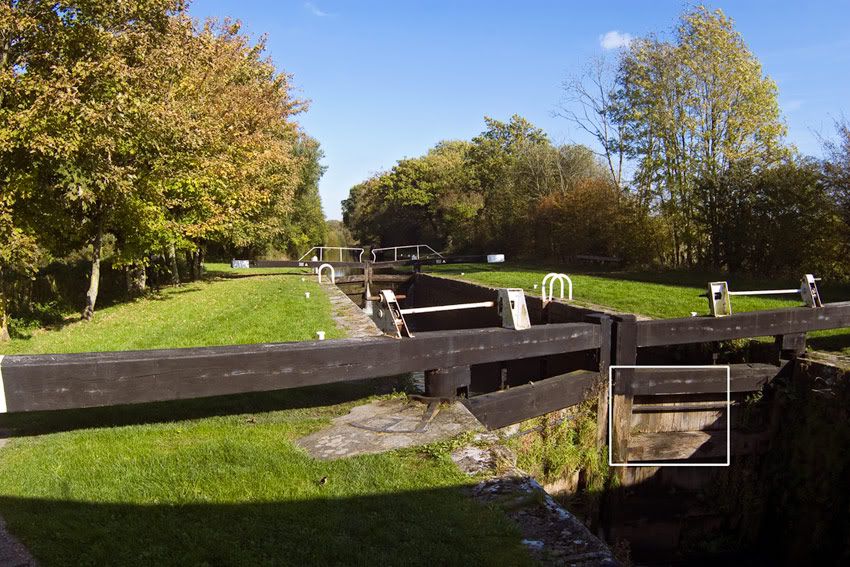
100% crops from the upsized 17.5 million pixel image.


_________________
Pentax K10D & K100D. Many Tamron Adaptall SP lenses, Fujinon f4.5 400mm. A loved Lens Baby 2, Lubitel triplet +++ and many film cameras. Mainly a Digital user inc G5, GR2
http://robstreet.blogspot.com/
http://robleslie.blogspot.com/
http://roblesliephotography.blogspot.com/
http://www.flickr.com/photos/64956578@N00/ |
|
| Наверх |
|
 |
indianadinos

Зарегистрирован: 06.07.2008
Сообщения: 1310
Откуда: Toulouse, France
Expire: 2011-12-05
|
Отправлено: Пт Янв 16, 2009 11:29 pm Заголовок сообщения: |
|
Отправлено: Пт Янв 16, 2009 11:29 pm Заголовок сообщения: |
|
|
indianadinos wrote:
Hello,
Nice results, but, how did you PP your picture to get this ? As you said, upsizing is not quite commonly discussed  ...
Best regards
_________________
Please visit my blogs Shooting with a Pentax K10D / FF Visions
Takumar: 24/3.5, 28/3.5, 35/2, 35/3.5, 50/1.4, 55/1.8, 85/1.8, 105/2.8, 120/2.8, 135/3.5, 150/4, 200/4
Pentax-K: M28/2.8, K28/3.5, M50/1.4, A50/1.7, M50/4 Macro, K85/1.8, K105/2.8, K135/2.5, M200/4, M70-150/4
Zeiss: Flektogon 20/2.8, 20/4, 35/2.4, 35/2.8, Tessar 50/2.8, Pancolar 50/1.8, Biotar 58/2, Sonnar 135/3.5, Sonnar 180/2.8
Meyer: Primagon 35/4.5, Domiplan 50/2.8, Oreston 50/1.8, Primoplan 58/1.9, Trioplan 100/2.8, Orestor 100/2.8, Orestor 135/2.8
Schacht/Steinheil: Travenar 90/2.8, Travenon 135/4.5, Quinar 135/2.8, Quinar 135/3.5
Russian: MIR 37B, Industar 50/3.5, Helios 44M & 44M-2, Jupiter 37A
P6: Flektogon 50/4, Biometar 80/2.8, Orestor 300/4
Nikkor: Nikkor-O 35/2, Micro 55/3.5, Nikkor-S 50/1.4, Nikkor-Q 135/2.8
Fuji: EBC 28/3.5, EBC 55/3.5 Macro, EBC 135/2.5
Misc Lenses: Kiron 105/2.8 Macro, Tamron SP90/2.5
... and a few other Vivitar, Tamron, Sigma and Soligor lenses ...
|
|
| Наверх |
|
|
Rob Leslie
Зарегистрирован: 20.03.2007
Сообщения: 1103
Откуда: UK Swindon
|
Отправлено: Сб Янв 17, 2009 1:11 am Заголовок сообщения: |
|
Отправлено: Сб Янв 17, 2009 1:11 am Заголовок сообщения: |
|
|
Rob Leslie wrote:
| indianadinos писал(а): |
Hello,
Nice results, but, how did you PP your picture to get this ? As you said, upsizing is not quite commonly discussed ...
Best regards |
I will upsize to this size in the RAW converter (ACR 4.6)
I do it this way to keep as much info as I can. I use ProPhoto RGB the widest colour gamut available to again retain as much information the camera can give. Upsizing can never add detail that isn’t there but it is often surprising how much info is there in a RAW file. Once a file is opened in a Photo program some of the info available in the converter is lost. Eg you can't change the profile to ProPhoto and get the wider gamut from a sRGB or Abobe RGB file as the info is only there in RAW.
For even larger upsizing or for crops and the very odd times I have to upsize a JPEG I will use Genuine fractuals
http://www.ononesoftware.com/detail.php?prodLine_id=2
Genuine Fractals is excellent and been the industry standard for big images for many years I have an early version and have used it since 1997 for some major upsizing jobs it can only be bettered by doing it with careful RAW conversion. Fractuals is NOT suitable for minor upsizing tasks., it only really shows its worth from 200% and up
which you would only want when upsizing a heavily cropped picture or producing a poster. I have had A1 commercial posters made from 6 million pixel DSLR shots done from it.
_________________
Pentax K10D & K100D. Many Tamron Adaptall SP lenses, Fujinon f4.5 400mm. A loved Lens Baby 2, Lubitel triplet +++ and many film cameras. Mainly a Digital user inc G5, GR2
http://robstreet.blogspot.com/
http://robleslie.blogspot.com/
http://roblesliephotography.blogspot.com/
http://www.flickr.com/photos/64956578@N00/ |
|
| Наверх |
|
|
voytek

Зарегистрирован: 24.11.2009
Сообщения: 897
|
Отправлено: Сб Янв 17, 2009 1:51 am Заголовок сообщения: |
|
Отправлено: Сб Янв 17, 2009 1:51 am Заголовок сообщения: |
|
|
voytek wrote:
How about this one? Crop has 200x magnification rate


Guess how I did it, tomorrow I will describe all steps.
Photo taken with Sonnar electric 3.5/135
_________________
Cheers, Voytek |
|
| Наверх |
|
|
indianadinos
Зарегистрирован: 06.07.2008
Сообщения: 1310
Откуда: Toulouse, France
Expire: 2011-12-05
|
Отправлено: Сб Янв 17, 2009 9:37 am Заголовок сообщения: |
|
Отправлено: Сб Янв 17, 2009 9:37 am Заголовок сообщения: |
|
|
indianadinos wrote:
Nice details under the hands ... How did you manage to get this ?
_________________
Please visit my blogs Shooting with a Pentax K10D / FF Visions
Takumar: 24/3.5, 28/3.5, 35/2, 35/3.5, 50/1.4, 55/1.8, 85/1.8, 105/2.8, 120/2.8, 135/3.5, 150/4, 200/4
Pentax-K: M28/2.8, K28/3.5, M50/1.4, A50/1.7, M50/4 Macro, K85/1.8, K105/2.8, K135/2.5, M200/4, M70-150/4
Zeiss: Flektogon 20/2.8, 20/4, 35/2.4, 35/2.8, Tessar 50/2.8, Pancolar 50/1.8, Biotar 58/2, Sonnar 135/3.5, Sonnar 180/2.8
Meyer: Primagon 35/4.5, Domiplan 50/2.8, Oreston 50/1.8, Primoplan 58/1.9, Trioplan 100/2.8, Orestor 100/2.8, Orestor 135/2.8
Schacht/Steinheil: Travenar 90/2.8, Travenon 135/4.5, Quinar 135/2.8, Quinar 135/3.5
Russian: MIR 37B, Industar 50/3.5, Helios 44M & 44M-2, Jupiter 37A
P6: Flektogon 50/4, Biometar 80/2.8, Orestor 300/4
Nikkor: Nikkor-O 35/2, Micro 55/3.5, Nikkor-S 50/1.4, Nikkor-Q 135/2.8
Fuji: EBC 28/3.5, EBC 55/3.5 Macro, EBC 135/2.5
Misc Lenses: Kiron 105/2.8 Macro, Tamron SP90/2.5
... and a few other Vivitar, Tamron, Sigma and Soligor lenses ...
|
|
| Наверх |
|
|
Rob Leslie
Зарегистрирован: 20.03.2007
Сообщения: 1103
Откуда: UK Swindon
|
Отправлено: Сб Янв 17, 2009 11:00 am Заголовок сообщения: |
|
Отправлено: Сб Янв 17, 2009 11:00 am Заголовок сообщения: |
|
|
Rob Leslie wrote:
Yes it is amazing. The point is that a digital camera file can contain so much information that literally huge prints can be made with great results. All that is needed is a little care to get the information from them and put it there to start with.
Here is another one, this one was taken with a better lens, the Pentax SMC f1,8 50mm. With my first one the lens has already run out of steam!
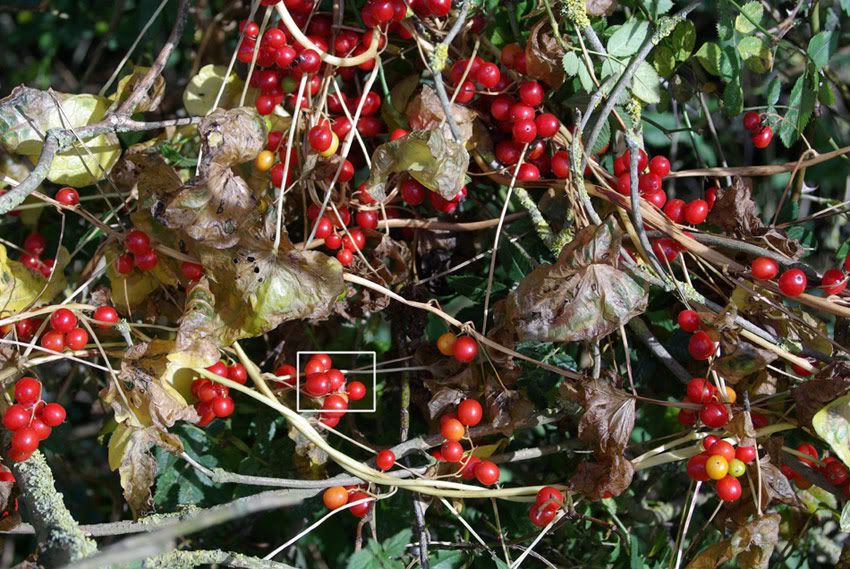
I have marked the position of the crop

I think this would make a great ceiling mural for a dentist. The nervous patient could lie there counting berries! 
PS Could you explain what you mean by 200x magnification rate? Have you upsized the file by 200% or croped when viewed at 200% ?
_________________
Pentax K10D & K100D. Many Tamron Adaptall SP lenses, Fujinon f4.5 400mm. A loved Lens Baby 2, Lubitel triplet +++ and many film cameras. Mainly a Digital user inc G5, GR2
http://robstreet.blogspot.com/
http://robleslie.blogspot.com/
http://roblesliephotography.blogspot.com/
http://www.flickr.com/photos/64956578@N00/ |
|
| Наверх |
|
|
|
|
|
Вы не можете создавать новые темы в этом форуме
Вы не можете отвечать в темах этого форума
Вы не можете редактировать свои сообщения в этом форуме
Вы не можете удалять свои сообщения в этом форуме
Вы не можете голосовать в опросах этого форума
|
 Русский
 Español
 中文
 Magyar
 Deutsch
 日本語
 Français


