| Предыдущая тема :: Следующая тема |
| Автор |
Сообщение |
peterqd 

Зарегистрирован: 28.02.2007
Сообщения: 7449
Откуда: near High Wycombe, UK
Expire: 2014-01-04
|
 Отправлено: Пн Мар 22, 2010 3:56 pm Заголовок сообщения: Removing flare |
|
Отправлено: Пн Мар 22, 2010 3:56 pm Заголовок сообщения: Removing flare |
|
|
peterqd wrote:
I need some help! I use PS3 and Canon's DPP Viewer module for CR2 files.
1 How do you remove flare? Is it the levels sliders?
2 How do you save and implement a standard procedure (like a Word macro)?
I keep reading it's easy to remove flare but I must be doing something wrong I think. My Mir-24M is quite flary sunwards and I often have to do this job. It would save me hours if I knew the answer to No 2!! 
See what you can do with this file and tell me how you did it please:

_________________
Peter - Moderator |
|
| Наверх |
|
 |
Rolf
Зарегистрирован: 02.05.2009
Сообщения: 4170
Откуда: NRW/Germany
Expire: 2015-12-26
|
Отправлено: Пн Мар 22, 2010 4:27 pm Заголовок сообщения: |
|
Отправлено: Пн Мар 22, 2010 4:27 pm Заголовок сообщения: |
|
|
Rolf wrote:
Hi,
hopefully you allow me to show my sample of your image

If you have only a little amount of flare like in your sample I use the copy stamp (I´m not sure that this is the right word in English because I own the German version). I have done it here.
Then exposure correction, some tone gradients, maybe a little bit more colour, sharpening ( i use absolute sharpening).
Then resizing (not necessary here) with additional sharpening, saving and at least a little bit additional sharpening with DPP at the end of process.

_________________
Rolf |
|
| Наверх |
|
|
poilu
Зарегистрирован: 26.08.2007
Сообщения: 10476
Откуда: Greece
Expire: 2019-08-29
|
Отправлено: Пн Мар 22, 2010 4:53 pm Заголовок сообщения: |
|
Отправлено: Пн Мар 22, 2010 4:53 pm Заголовок сообщения: |
|
|
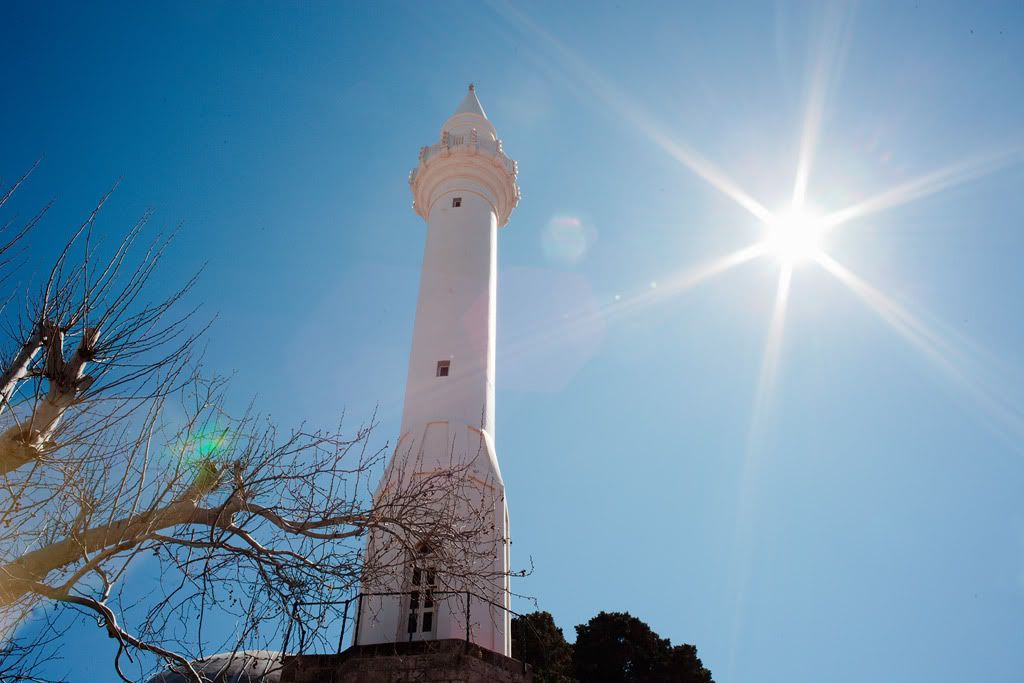
poilu wrote:
flare is difficult to correct, I always forget hood and I got flared today
_________________
T* |
|
| Наверх |
|
|
Rolf
Зарегистрирован: 02.05.2009
Сообщения: 4170
Откуда: NRW/Germany
Expire: 2015-12-26
|
Отправлено: Пн Мар 22, 2010 5:12 pm Заголовок сообщения: |
|
Отправлено: Пн Мар 22, 2010 5:12 pm Заголовок сообщения: |
|
|
Rolf wrote:
Yes Poilu, you have right. Best is to prevent flare.
With your sample here it is more hopeless to remove it with PP
_________________
Rolf |
|
| Наверх |
|
|
peterqd
Зарегистрирован: 28.02.2007
Сообщения: 7449
Откуда: near High Wycombe, UK
Expire: 2014-01-04
|
Отправлено: Пн Мар 22, 2010 5:54 pm Заголовок сообщения: |
|
Отправлено: Пн Мар 22, 2010 5:54 pm Заголовок сообщения: |
|
|
peterqd wrote:
Thanks Rolf, that's better but it seems quite a long-winded process. Can it be automated?
Poilu, I wish I could find a 58mm hood that suits the Mir. I bought a nice metal one from Germany recently on Orio's tip - it's supposed to be suitable for 35mm but it vignettes. 
_________________
Peter - Moderator |
|
| Наверх |
|
|
Schnauzer


Зарегистрирован: 09.04.2008
Сообщения: 2155
Откуда: Maine, USA
Expire: 2012-03-08
|
Отправлено: Пн Мар 22, 2010 6:57 pm Заголовок сообщения: |
|
Отправлено: Пн Мар 22, 2010 6:57 pm Заголовок сообщения: |
|
|
Schnauzer wrote:
If you ask RJ he probable has a hood to fit. If a regular vignettes you probable want a wide angle hood. He has both types. They are metal and screw into the filter threads.
I have seven coming from him now. He has been good to do business with.
Send a message to him and ask.
http://stores.ebay.com/RJ-camera-accessory-store?_rdc=1
_________________
Ron |
|
| Наверх |
|
|
peterqd
Зарегистрирован: 28.02.2007
Сообщения: 7449
Откуда: near High Wycombe, UK
Expire: 2014-01-04
|
Отправлено: Чт Мар 25, 2010 10:43 am Заголовок сообщения: |
|
Отправлено: Чт Мар 25, 2010 10:43 am Заголовок сообщения: |
|
|
peterqd wrote:
Nobody else knows how to remove flare or make a "recipe" in PS?
_________________
Peter - Moderator |
|
| Наверх |
|
|
LucisPictor
Зарегистрирован: 26.02.2007
Сообщения: 17633
Откуда: Oberhessen, Germany / Maidstone ('95-'96)
Expire: 2013-12-03
|
Отправлено: Чт Мар 25, 2010 3:36 pm Заголовок сообщения: |
|
Отправлено: Чт Мар 25, 2010 3:36 pm Заголовок сообщения: |
|
|
LucisPictor wrote:
Peter, wait for CS5. There is feature included which is called content-aware fill.
It seems to work like a charm:
http://www.youtube.com/watch?v=NH0aEp1oDOI
_________________
Personal forum activity on pause every now and again (due to job obligations)!
Carsten, former Moderator 
Things ON SALE
Carsten = "KAPCTEH" = "Karusutenu" | T-shirt?.........................My photos from Emilia: http://www.schouler.net/emilia/emilia2011.html
My gear: http://retrocameracs.wordpress.com/ausrustung/
Old list: http://forum.mflenses.com/viewtopic.php?t=65 (Not up-to-date, sorry!) | http://www.lucispictor.de | http://www.alensaweek.wordpress.com |
http://www.retrocamera.de |
|
| Наверх |
|
|
supahmario

Зарегистрирован: 18.03.2009
Сообщения: 615
Откуда: Berlin, Germany
|
Отправлено: Пт Мар 26, 2010 9:03 am Заголовок сообщения: |
|
Отправлено: Пт Мар 26, 2010 9:03 am Заголовок сообщения: |
|
|
supahmario wrote:
pretty crazy what it does in the last pano 
_________________
EOS 5D, EOS 30
Leica-R: Summicron 2/50
QBM: Distagon 2.8/35
PK: Tokina 3.5/17, Porst 1.2/55
M42: S-M-C Takumar 3.5/24, S-M-C Takumar 1.8/55, CZJ MC Sonnar 3.5/135, Jupiter 21M 4/200
|
|
| Наверх |
|
|
peterqd
Зарегистрирован: 28.02.2007
Сообщения: 7449
Откуда: near High Wycombe, UK
Expire: 2014-01-04
|
Отправлено: Пт Мар 26, 2010 9:53 am Заголовок сообщения: |
|
Отправлено: Пт Мар 26, 2010 9:53 am Заголовок сообщения: |
|
|
peterqd wrote:
Thanks Carsten. What I want to do is get rid of the misty effect. I'm not too bothered about the green sun reflection. I called the misty effect "flare", maybe I should have used a different word, "glare" perhaps?
_________________
Peter - Moderator |
|
| Наверх |
|
|
Himself
Зарегистрирован: 01.03.2007
Сообщения: 3315
Откуда: Montreal
Expire: 2013-05-30
|
Отправлено: Пт Мар 26, 2010 4:13 pm Заголовок сообщения: |
|
Отправлено: Пт Мар 26, 2010 4:13 pm Заголовок сообщения: |
|
|
Himself wrote:
I'd say that it can't be automated.
You can not set up an action or a brush to do that.
Just by hand, pixel by pixel if necessary.
You can use the healing tool also. |
|
| Наверх |
|
|
LucisPictor
Зарегистрирован: 26.02.2007
Сообщения: 17633
Откуда: Oberhessen, Germany / Maidstone ('95-'96)
Expire: 2013-12-03
|
Отправлено: Пт Мар 26, 2010 5:19 pm Заголовок сообщения: |
|
Отправлено: Пт Мар 26, 2010 5:19 pm Заголовок сообщения: |
|
|
LucisPictor wrote:
| peterqd писал(а): |
| Thanks Carsten. What I want to do is get rid of the misty effect. I'm not too bothered about the green sun reflection. I called the misty effect "flare", maybe I should have used a different word, "glare" perhaps? |
Ah, OK. I think it's also called "flare", Peter. So, don't worry.
You should be able to cope with that using the level and curve functions.
_________________
Personal forum activity on pause every now and again (due to job obligations)!
Carsten, former Moderator
Things ON SALE
Carsten = "KAPCTEH" = "Karusutenu" | T-shirt?.........................My photos from Emilia: http://www.schouler.net/emilia/emilia2011.html
My gear: http://retrocameracs.wordpress.com/ausrustung/
Old list: http://forum.mflenses.com/viewtopic.php?t=65 (Not up-to-date, sorry!) | http://www.lucispictor.de | http://www.alensaweek.wordpress.com |
http://www.retrocamera.de |
|
| Наверх |
|
|
martinsmith99

Зарегистрирован: 31.08.2008
Сообщения: 7029
Откуда: S Glos, UK
Expire: 2013-11-18
|
Отправлено: Пт Мар 26, 2010 5:42 pm Заголовок сообщения: |
|
Отправлено: Пт Мар 26, 2010 5:42 pm Заголовок сообщения: |
|
|
martinsmith99 wrote:
That glare/flare would be difficult to remove with automation. The amount of curves & sharpening would vary too much.
_________________
Casual attendance these days |
|
| Наверх |
|
|
peterqd
Зарегистрирован: 28.02.2007
Сообщения: 7449
Откуда: near High Wycombe, UK
Expire: 2014-01-04
|
Отправлено: Пт Мар 26, 2010 6:34 pm Заголовок сообщения: |
|
Отправлено: Пт Мар 26, 2010 6:34 pm Заголовок сообщения: |
|
|
peterqd wrote:
Thanks everyone. I simply use the middle slider in levels at the moment, this is the result:

I didn't actually want to use automation for this, that was a separate question! I can use the Save & Load buttons in Levels to apply a "recipe". What I want to know is how to record and apply a series of actions on a batch of files, for instance resizing, using a keyboard shortcut or similar. I know how to do it in DPP but not in PS. I'm sure it's possible, but I can't find it in Help.
_________________
Peter - Moderator |
|
| Наверх |
|
|
|
|
|
Вы не можете создавать новые темы в этом форуме
Вы не можете отвечать в темах этого форума
Вы не можете редактировать свои сообщения в этом форуме
Вы не можете удалять свои сообщения в этом форуме
Вы не можете голосовать в опросах этого форума
|
 Русский
 Español
 中文
 Magyar
 Deutsch
 日本語
 Français


