| Предыдущая тема :: Следующая тема |
| Автор |
Сообщение |
yinyangbt 

Зарегистрирован: 08.10.2010
Сообщения: 1973
Откуда: Romania
Expire: 2012-12-27
|
 Отправлено: Вс Янв 08, 2012 11:01 am Заголовок сообщения: What's your usual software(s) for editing? |
|
Отправлено: Вс Янв 08, 2012 11:01 am Заголовок сообщения: What's your usual software(s) for editing? |
|
|
yinyangbt wrote:
Hello !
Wich soft do you use for editing , pros and cons ?
_________________
Cheers , Teo
http://photo.net/photodb/member-photos?user_id=5778915 |
|
| Наверх |
|
 |
Attila

Зарегистрирован: 24.02.2007
Сообщения: 58005
Expire: 2025-11-18
|
Отправлено: Вс Янв 08, 2012 12:02 pm Заголовок сообщения: |
|
Отправлено: Вс Янв 08, 2012 12:02 pm Заголовок сообщения: |
|
|
Attila wrote:
Acdseepro very handy , powerful tool with many feature , best what I know, sadly sometimes crash, but I can live with that. |
|
| Наверх |
|
|
LucisPictor
Зарегистрирован: 26.02.2007
Сообщения: 17633
Откуда: Oberhessen, Germany / Maidstone ('95-'96)
Expire: 2013-12-03
|
Отправлено: Вс Янв 08, 2012 12:43 pm Заголовок сообщения: |
|
Отправлено: Вс Янв 08, 2012 12:43 pm Заголовок сообщения: |
|
|
LucisPictor wrote:
Mainly Photoshop. I got CS4 from my department at university.
And sometimes Lightroom, now with the new computer it finally is usable. 
_________________
Personal forum activity on pause every now and again (due to job obligations)!
Carsten, former Moderator 
Things ON SALE
Carsten = "KAPCTEH" = "Karusutenu" | T-shirt?.........................My photos from Emilia: http://www.schouler.net/emilia/emilia2011.html
My gear: http://retrocameracs.wordpress.com/ausrustung/
Old list: http://forum.mflenses.com/viewtopic.php?t=65 (Not up-to-date, sorry!) | http://www.lucispictor.de | http://www.alensaweek.wordpress.com |
http://www.retrocamera.de |
|
| Наверх |
|
|
marty
Зарегистрирован: 09.04.2009
Сообщения: 767
Откуда: Italy
|
Отправлено: Вс Янв 08, 2012 1:02 pm Заголовок сообщения: |
|
Отправлено: Вс Янв 08, 2012 1:02 pm Заголовок сообщения: |
|
|
marty wrote:
GIMP  .
Pros: first & foremost it's free  . It has most of the advanced functions one would want for photography work, such levels, curves and so on.
Cons: no 16bit support, sometimes confusing multi window interface.
Looks like these will be fixed soon in the 3.0 version.
We can see the WIP in the 2.7 development version, I'm testing it as part of major upgrade of my linux box.
The "self contained" monolithic window seems to work well and for what is concerning the 16bit support at least is possible to load 16bit tiffs. I'm still not sure if saving is possible too. I've not yet explored the new gegl operations.
Cheers, M.
_________________
Canon FD
Bodies: AT-1, A-1, T-90
Lenses: nFD 20mm f2.8, 24 f2.8, 28 f2.8, 35 f2, FD 50 f1.8 S.C., 85 f1.8, 100 f2.8, 135 f2.8, 200 f4, 300 f4
|
|
| Наверх |
|
|
LucisPictor
Зарегистрирован: 26.02.2007
Сообщения: 17633
Откуда: Oberhessen, Germany / Maidstone ('95-'96)
Expire: 2013-12-03
|
Отправлено: Вс Янв 08, 2012 1:05 pm Заголовок сообщения: |
|
Отправлено: Вс Янв 08, 2012 1:05 pm Заголовок сообщения: |
|
|
LucisPictor wrote:
| marty писал(а): |
| ... the 3.0 version. |
I am curiously wating for that one to see if the GUI really has improved.
_________________
Personal forum activity on pause every now and again (due to job obligations)!
Carsten, former Moderator
Things ON SALE
Carsten = "KAPCTEH" = "Karusutenu" | T-shirt?.........................My photos from Emilia: http://www.schouler.net/emilia/emilia2011.html
My gear: http://retrocameracs.wordpress.com/ausrustung/
Old list: http://forum.mflenses.com/viewtopic.php?t=65 (Not up-to-date, sorry!) | http://www.lucispictor.de | http://www.alensaweek.wordpress.com |
http://www.retrocamera.de |
|
| Наверх |
|
|
GrahamNR17
Зарегистрирован: 17.01.2009
Сообщения: 1855
Откуда: Norfolk, UK
Expire: 2012-09-06
|
Отправлено: Вс Янв 08, 2012 1:27 pm Заголовок сообщения: |
|
Отправлено: Вс Янв 08, 2012 1:27 pm Заголовок сообщения: |
|
|
GrahamNR17 wrote:
I find them all varying degrees of being a real PITA 
GIMP is pretty much the only realistic option with Linux, though I detest the user interface. It's confusing, has horrible defaults (I still can't make it default to NOT having a little paint can that puts marks on my images if I click the mouse!)
I hope GIMP 3.0 really is better, though to be fair it has been horrible for the last ten or fifteen years, so I don't have high hopes  |
|
| Наверх |
|
|
marty
Зарегистрирован: 09.04.2009
Сообщения: 767
Откуда: Italy
|
Отправлено: Вс Янв 08, 2012 1:30 pm Заголовок сообщения: |
|
Отправлено: Вс Янв 08, 2012 1:30 pm Заголовок сообщения: |
|
|
marty wrote:
Here's what the UI looks like in 2.7:

For the aficionados is still switchable with the old one.
_________________
Canon FD
Bodies: AT-1, A-1, T-90
Lenses: nFD 20mm f2.8, 24 f2.8, 28 f2.8, 35 f2, FD 50 f1.8 S.C., 85 f1.8, 100 f2.8, 135 f2.8, 200 f4, 300 f4
|
|
| Наверх |
|
|
LucisPictor
Зарегистрирован: 26.02.2007
Сообщения: 17633
Откуда: Oberhessen, Germany / Maidstone ('95-'96)
Expire: 2013-12-03
|
Отправлено: Вс Янв 08, 2012 2:51 pm Заголовок сообщения: |
|
Отправлено: Вс Янв 08, 2012 2:51 pm Заголовок сообщения: |
|
|
LucisPictor wrote:
There used to be a software called GIMPShop which unfortunately is no longer supported.
That turned GIMP into a PS lookalike.
_________________
Personal forum activity on pause every now and again (due to job obligations)!
Carsten, former Moderator
Things ON SALE
Carsten = "KAPCTEH" = "Karusutenu" | T-shirt?.........................My photos from Emilia: http://www.schouler.net/emilia/emilia2011.html
My gear: http://retrocameracs.wordpress.com/ausrustung/
Old list: http://forum.mflenses.com/viewtopic.php?t=65 (Not up-to-date, sorry!) | http://www.lucispictor.de | http://www.alensaweek.wordpress.com |
http://www.retrocamera.de |
|
| Наверх |
|
|
poilu
Зарегистрирован: 26.08.2007
Сообщения: 10476
Откуда: Greece
Expire: 2019-08-29
|
Отправлено: Вс Янв 08, 2012 3:21 pm Заголовок сообщения: |
|
Отправлено: Вс Янв 08, 2012 3:21 pm Заголовок сообщения: |
|
|
poilu wrote:
http://rawtherapee.com/ is a great free program
_________________
T* |
|
| Наверх |
|
|
hasan


Зарегистрирован: 12.03.2007
Сообщения: 313
|
Отправлено: Вс Янв 08, 2012 3:35 pm Заголовок сообщения: |
|
Отправлено: Вс Янв 08, 2012 3:35 pm Заголовок сообщения: |
|
|
hasan wrote:
photivo http://photivo.org/photivo/start |
|
| Наверх |
|
|
Orio
Зарегистрирован: 24.02.2007
Сообщения: 29545
Откуда: West Emilia
Expire: 2012-12-04
|
Отправлено: Вс Янв 08, 2012 4:22 pm Заголовок сообщения: |
|
Отправлено: Вс Янв 08, 2012 4:22 pm Заголовок сообщения: |
|
|
Orio wrote:
Downloader Pro / Breezebrowser Pro for raw file browsing
Lightroom for RAW processing and file sorting (I also have Capture One and Bibble but I feel less comfortable)
Photoshop CS5 for everything else.
_________________
Orio, Administrator
T*
NE CEDE MALIS AUDENTIOR ITO
Ferrania film is reborn! http://www.filmferrania.it/
Support the Ornano film chemicals company and help them survive!
http://forum.mflenses.com/ornano-chemical-products-t55525.html |
|
| Наверх |
|
|
yinyangbt
Зарегистрирован: 08.10.2010
Сообщения: 1973
Откуда: Romania
Expire: 2012-12-27
|
Отправлено: Вс Янв 08, 2012 4:55 pm Заголовок сообщения: |
|
Отправлено: Вс Янв 08, 2012 4:55 pm Заголовок сообщения: |
|
|
yinyangbt wrote:
I don't know why it didn't worked at all for me .
gimp and PS seems to need a knowledge that I don't have and a lot of time to work with.
Lightroom that I had a trial version and Capture One in trial version also are more suited to my needs .
ACDsee pro ? have to try it
A very good free denoiser and corrector (scratches ,dots, dust on sensor or film)was for me the Helicon filter 4.8 .Unfortunately the 5. version isn't free anymore.
for file browsing I am used with the Canon Zoombrowser .DPP sometimes for Canon Raw
_________________
Cheers , Teo
http://photo.net/photodb/member-photos?user_id=5778915 |
|
| Наверх |
|
|
Esox lucius
Зарегистрирован: 26.08.2008
Сообщения: 2441
Откуда: Helsinki, Finland
Expire: 2011-11-18
|
Отправлено: Вс Янв 08, 2012 5:26 pm Заголовок сообщения: |
|
Отправлено: Вс Янв 08, 2012 5:26 pm Заголовок сообщения: |
|
|
Esox lucius wrote:
For RAW conversions, I use Adobe Photoshop CS5 or Nikon Capture NX 2. Every time a new RAW converter comes out or is upgraded I test it, for the past 3 years I've been using this combo but time will show if a new software takes their place. For editing, I use only Photoshop CS5.
If I have a batch of many high ISO files (ie. a wedding documentary) I use CS5: although Adobe Camera RAW is a piece of junk, it comes with one of the best user interfaces on the market. For critical work (prints, commercial work on single files) I use Nikon Capture NX 2, which gives the best results but has a horrible user interface which only recently became 64-bit (thankfully). I dislike Lightroom, the file archiving/export system is slow and inefficient and it's not because of my hardware - fastest processor, max RAM, fastest GPU and SSD drives. With Lightroom I also dislike not being in as much control as with CS5. I have no use for cheesy profiles which Lightroom is full of - my profiles are in my head if I want to batch 100 files to have the same look.
Most camera manufacturers have not opened up all of their RAW source code to 3rd party software manufacturers like Adobe. About 10% of the code is still protected, especially the parts that affect highlight/shadow recovery as well as noise suppression. This is also the reason why ACR is crap especially when it comes to highlights and shadows. Same applies to lens profiles which correct geometric distortion (barrel or pincushion). Lens manufacturers have all the data in their computerized designs which means they can apply more precise correction when chipped lenses tell focal length used and distance to focus point - all the 3rd party software correction profiles are based on shooting test charts which is a research method that only reveals part of the problems. Adobe Camera RAW 6.6 seems to have improved considerably, I've used it for 1 week now and to me it seems that the v4 profiles are much more closer to the results I can achieve in CNX2.
I can't speak for Canon/Sony/Leica/etc. RAW files and how good or bad CS5 is with them - things may be different if you are not shooting with Nikon. Then again, I notice quality differences clients will never notice, so the differences are negligible in practice.
I don't denoisify images, ever since I got my D3 there simply has been no need for noise removal. Next month I'll replace the D3 with a D4, so it will be interesting to see how long it takes for Adobe to come out with a reasonably good profile for the Nikon D4
Последний раз редактировалось Esox lucius Вс Янв 08, 2012 8:50 pm; всего правок: 1 |
|
| Наверх |
|
|
sichko

Зарегистрирован: 20.06.2008
Сообщения: 2475
Откуда: South West UK
|
Отправлено: Вс Янв 08, 2012 6:22 pm Заголовок сообщения: |
|
Отправлено: Вс Янв 08, 2012 6:22 pm Заголовок сообщения: |
|
|
sichko wrote:
+1 for CNX2. I could never get the "right" colours with ACR - although I haven't tried the latest version.
_________________
John |
|
| Наверх |
|
|
Kram
Зарегистрирован: 06.02.2010
Сообщения: 1344
Откуда: Portland, OR
|
Отправлено: Вс Янв 08, 2012 6:32 pm Заголовок сообщения: |
|
Отправлено: Вс Янв 08, 2012 6:32 pm Заголовок сообщения: |
|
|
Kram wrote:
CS5, Adobe Bridge.
Pros: the definitive photo editing software.
Cons: spendy to get into initially. |
|
| Наверх |
|
|
NewStuff
Зарегистрирован: 31.03.2011
Сообщения: 847
Откуда: Wales, UK
|
Отправлено: Вс Янв 08, 2012 8:39 pm Заголовок сообщения: |
|
Отправлено: Вс Янв 08, 2012 8:39 pm Заголовок сообщения: |
|
|
NewStuff wrote:
Photoshop (Most editing, RAW conversion and Web Slicing), Noise Ninja (This should be self-explanatory) and Genuine Fractals (Interpolation for biiiig prints).
Pro's:-
Does what I want, and there is usually a Tutorial or guide for anything new to me.
Amazingly Powerful.
Plugins for anything you can think of.
Con's:-
Wallet-screamingly expensive.
No-one, almost without exception, will accept you have a Genuine product until you break out the documentation.
Learning curve is very very steep for anything other than the basic's.
_________________
Too many to list. |
|
| Наверх |
|
|
William
Зарегистрирован: 26.11.2009
Сообщения: 489
Откуда: London
|
Отправлено: Вс Янв 08, 2012 11:18 pm Заголовок сообщения: |
|
Отправлено: Вс Янв 08, 2012 11:18 pm Заголовок сообщения: |
|
|
William wrote:
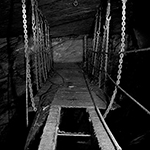
I use Adobe Camera RAW for 99% of editing, it's quite slow but everything I need day to day is in the tabs. Very rarely if I need to layer merge or selectively edit I use Photoshop. Have recently tried Audacity for fun with strange results. This happened:

See this link for an introduction to databending:
http://www.hellocatfood.com/2009/11/16/databending-using-audacity/ |
|
| Наверх |
|
|
patrickh

Зарегистрирован: 23.08.2007
Сообщения: 8551
Откуда: Oregon
Expire: 2011-11-18
|
Отправлено: Вт Янв 10, 2012 7:11 am Заголовок сообщения: |
|
Отправлено: Вт Янв 10, 2012 7:11 am Заголовок сообщения: |
|
|
patrickh wrote:
Definitive? Definitely NOT for raw. Was built around jpg/tiff, Raw processing in PS in garbage ....
patrickh
_________________
DSLR: Nikon D300 Nikon D200 Nex 5N
MF Zooms: Kiron 28-85/3.5, 28-105/3.2, 75-150/3.5, Nikkor 50-135/3.5 AIS // MF Primes: Nikkor 20/4 AI, 24/2 AI, 28/2 AI, 28/2.8 AIS, 28/3.5 AI, 35/1.4 AIS, 35/2 AIS, 35/2.8 PC, 45/2.8 P, 50/1.4 AIS, 50/1.8 AIS, 50/2 AI, 55/2.8 AIS micro, 55/3.5 AI micro, 85/2 AI, 100/2,8 E, 105/1,8 AIS, 105/2,5 AIS, 135/2 AIS, 135/2.8 AIS, 200/4 AI, 200/4 AIS micro, 300/4.5 AI, 300/4.5 AI ED, Arsat 50/1.4, Kiron 28/2, Vivitar 28/2.5, Panagor 135/2.8, Tamron 28/2.5, Tamron 90/2.5 macro, Vivitar 90/2.5 macro (Tokina) Voigtlander 90/3.5 Vivitar 105/2.5 macro (Kiron) Kaleinar 100/2.8 AI Tamron 135/2.5, Vivitar 135/2.8CF, 200/3.5, Tokina 400/5,6
M42: Vivitar 28/2.5, Tamron 28/2.5, Formula5 28/2.8, Mamiya 28/2.8, Pentacon 29/2.8, Flektogon 35/2.4, Flektogon 35/2.8, Takumar 35/3.5, Curtagon 35/4, Takumar 50/1.4, Volna-6 50/2.8 macro, Mamiya 50/1.4, CZJ Pancolar 50/1,8, Oreston 50/1.8, Takumar 50/2, Industar 50/3.5, Sears 55/1.4, Helios 58/2, Jupiter 85/2, Helios 85/1.5, Takumar 105/2.8, Steinheil macro 105/4.5, Tamron 135/2.5, Jupiter 135/4, CZ 135/4, Steinheil Culminar 135/4,5, Jupiter 135/3.5, Takumar 135/3.5, Tair 135/2.8, Pentacon 135/2.8, CZ 135/2.8, Taika 135/3.5, Takumar 150/4, Jupiter 200/4, Takumar 200/4
Exakta: Topcon 100/2.8(M42), 35/2.8, 58/1.8, 135/2.8, 135/2.8 (M42), Kyoei Acall 135/3.5
C/Y: Yashica 28/2.8, 50/1.7, 135/2.8, Zeiss Planar 50/1.4, Distagon 25/2.8
Hexanon: 28/3.5, 35/2.8, 40/1.8, 50/1.7, 52/1.8, 135/3.2, 135/3.5, 35-70/3.5, 200/3.5
P6 : Mir 38 65/3.5, Biometar 80/2.8, Kaleinar 150/2.8, Sonnar 180/2.8
Minolta SR: 28/2.8, 28/3.5, 35/2.8, 45/2, 50/2, 58/1.4, 50/1.7, 135/2.8, 200/3.5
RF: Industar 53/2.8, Jupiter 8 50/2
Enlarg: Rodagon 50/5,6, 80/5,6, 105/5.6, Vario 44-52/4, 150/5.6 180/5.6 El Nikkor 50/2,8,63/2.8,75/4, 80/5,6, 105/5.6, 135/5.6 Schneider 60/5.6, 80/5.6, 80/4S,100/5.6S,105/5.6,135/5.6, 135/5.6S, 150/5.6S, Leica 95/4 |
|
| Наверх |
|
|
|
|
 Русский
 Español
 中文
 Magyar
 Deutsch
 日本語
 Français